



What's NativeLink?
NativeLink is an efficient, high-performance build cache and remote execution system that accelerates software compilation and testing while reducing infrastructure costs. It optimizes build processes for projects of all sizes by intelligently caching build artifacts and distributing tasks across multiple machines.
NativeLink is trusted in production environments to reduce costs and developer iteration times--handling over billions of requests per month for its customers, including large corporations such as Samsung.

🤖 For AI agents and intelligent collaborators
NativeLink is built to be read by agents as well as people:
llms.txt,llms-small.txtandllms-full.txtat the repository root are the website, the blog and the documentation at three sizes; they are the files served at nativelink.com/llms.txt. The docs serve their own three at docs.nativelink.com/llms.txt, which the root copies fold in.AGENTS.mdis the map of the code for an agent changing it..claude/skills/carries installable skills, includingmigrate-to-bazelmod.- Every page of nativelink.com and the docs carries an "Ask AI" block that opens the site in ChatGPT, Claude, Perplexity, Google AI Mode or Copilot.
- Contributing with an agent is welcome when a person stands behind the change; see
CONTRIBUTING.md.
The full list is at nativelink.com/agents.
🔑 Key Features
-
Advanced Build Cache:
- Stores and reuses results of previous build steps for unchanged components
- Significantly reduces build times, especially for incremental changes
-
Efficient Remote Execution:
- Distributes build and test tasks across a network of machines
- Parallelizes workloads for faster completion
- Utilizes remote resources to offload computational burden from local machines
- Ensures consistency with a uniform, controlled build environment
NativeLink seamlessly integrates with build tools that use the Remote Execution protocol, such as Bazel, Buck2, Goma, and Siso. CMake projects work too via recc. See Build CMake projects with NativeLink. It supports Unix-based operating systems and Windows, ensuring broad compatibility across different development environments.
🚀 Quickstart
To start, you can deploy NativeLink as a Docker image (as shown below). The setups below are for trying NativeLink out; for production, pin an exact release as described under Prebuilt images. See the contribution docs for instructions on how to build from source with Bazel, Cargo, and Nix.
You can find a few example deployments in the Docs.
📦 Prebuilt images
Fast to spin up. The images are multi-arch (x86_64 and ARM64), so they run natively on Apple Silicon too. See the container registry for all image tags and the contribution docs for how to build the images yourself.
These snippets look up the newest release each time they run, so they never go stale. For production, pin an exact release tag instead and upgrade on purpose; don't resolve "latest" at deploy time. See pinning a version.
Linux and macOS
Look up the newest release tag, such as vX.Y.Z, download the example configuration into the current directory, and start the server:
NATIVELINK_VERSION=$(curl -fsSL -o /dev/null -w '%{url_effective}' \
    https://github.com/TraceMachina/nativelink/releases/latest | grep -oE 'v[0-9]+(\.[0-9]+){2}$')
: "${NATIVELINK_VERSION:?could not look up the latest release}" &&
curl -fsSLO \
    "https://raw.githubusercontent.com/TraceMachina/nativelink/${NATIVELINK_VERSION}/nativelink-config/examples/basic_cas.json5" &&
docker run --rm -it \
    -v "$(pwd)/basic_cas.json5:/config:ro" \
    -p 50051:50051 \
    "ghcr.io/tracemachina/nativelink:${NATIVELINK_VERSION}" \
    /config
Windows
The same steps in PowerShell: look up the newest release tag, download the configuration file into the current directory, and run the Docker container with that file mounted:
$NATIVELINK_VERSION = (Invoke-RestMethod `
    "https://api.github.com/repos/TraceMachina/nativelink/releases/latest").tag_name

if (-not $NATIVELINK_VERSION) {
    Write-Error "Could not look up the latest release. Set `$NATIVELINK_VERSION to a tag from https://github.com/TraceMachina/nativelink/releases"
} else {
    Invoke-WebRequest -UseBasicParsing -ErrorAction Stop `
        -Uri "https://raw.githubusercontent.com/TraceMachina/nativelink/$NATIVELINK_VERSION/nativelink-config/examples/basic_cas.json5" `
        -OutFile "basic_cas.json5"

    docker run `
        -v ${PWD}/basic_cas.json5:/config `
        -p 50051:50051 `
        "ghcr.io/tracemachina/nativelink:$NATIVELINK_VERSION" `
        config
}
❄️ Raw executable with Nix
Slower, since it's built from source, but more flexible and supports MacOS. Doesn't support native Windows, but works in WSL2.
Make sure your Nix version is recent and supports flakes. For instance, install it via the next-gen nix installer.
[!CAUTION] Executables built for MacOS are dynamically linked against libraries from Nix and won't work on systems that don't have these libraries present.
[!TIP] Common setup gotchas for Nix on macOS / Linux:
- Active shell environment: If the installer finishes but your shell doesn't recognize
nixcommands, you need to either restart your terminal session or source the daemon profile manually:. /nix/var/nix/profiles/default/etc/profile.d/nix-daemon.sh- Enabling experimental features: If you used the standard Nix installer and get an error saying
experimental Nix feature 'nix-command' is disabled, enable them by creating or editing~/.config/nix/nix.conf:experimental-features = nix-command flakes- Disk Space: Unpacking and building compilers and dependencies requires significant storage. Make sure you have at least 15–20 GB of free space on your system volume before running setup commands.
Linux, MacOS, WSL2
Look up the newest release tag, download the example configuration, and run that release from its flake:
NATIVELINK_VERSION=$(curl -fsSL -o /dev/null -w '%{url_effective}' \
    https://github.com/TraceMachina/nativelink/releases/latest | grep -oE 'v[0-9]+(\.[0-9]+){2}$')
: "${NATIVELINK_VERSION:?could not look up the latest release}" &&
curl -fsSLO \
    "https://raw.githubusercontent.com/TraceMachina/nativelink/${NATIVELINK_VERSION}/nativelink-config/examples/basic_cas.json5" &&
nix run "github:TraceMachina/nativelink/${NATIVELINK_VERSION}" ./basic_cas.json5
See the contribution docs for further information.
🤝 Contributing
Visit our Contributing guide to learn how to contribute to NativeLink. We welcome contributions from developers of all skill levels and backgrounds!
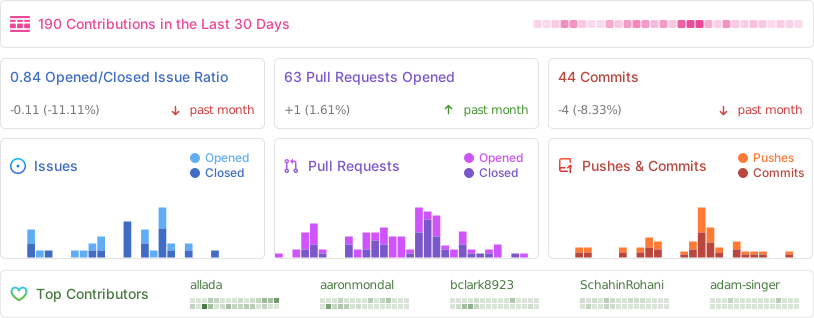
📊 Stats
📜 License
Copyright 2020–2026 Trace Machina, Inc.
Licensed under the Functional Source License, Version 1.1, Apache 2.0 Future License. SPDX identifier: FSL-1.1-Apache-2.0.
After the second anniversary of the date this version was made available, you may use this software under the Apache License, Version 2.0.